

An Overview of Accelerated Database Recovery

SQL Server has had a number of really wonderful new features over the last several releases. One of those features is Accelerated Database Recovery. This enhancement has received some coverage in the community and I want to make my own contribution to promoting this feature.
What is Accelerated Database Recovery?
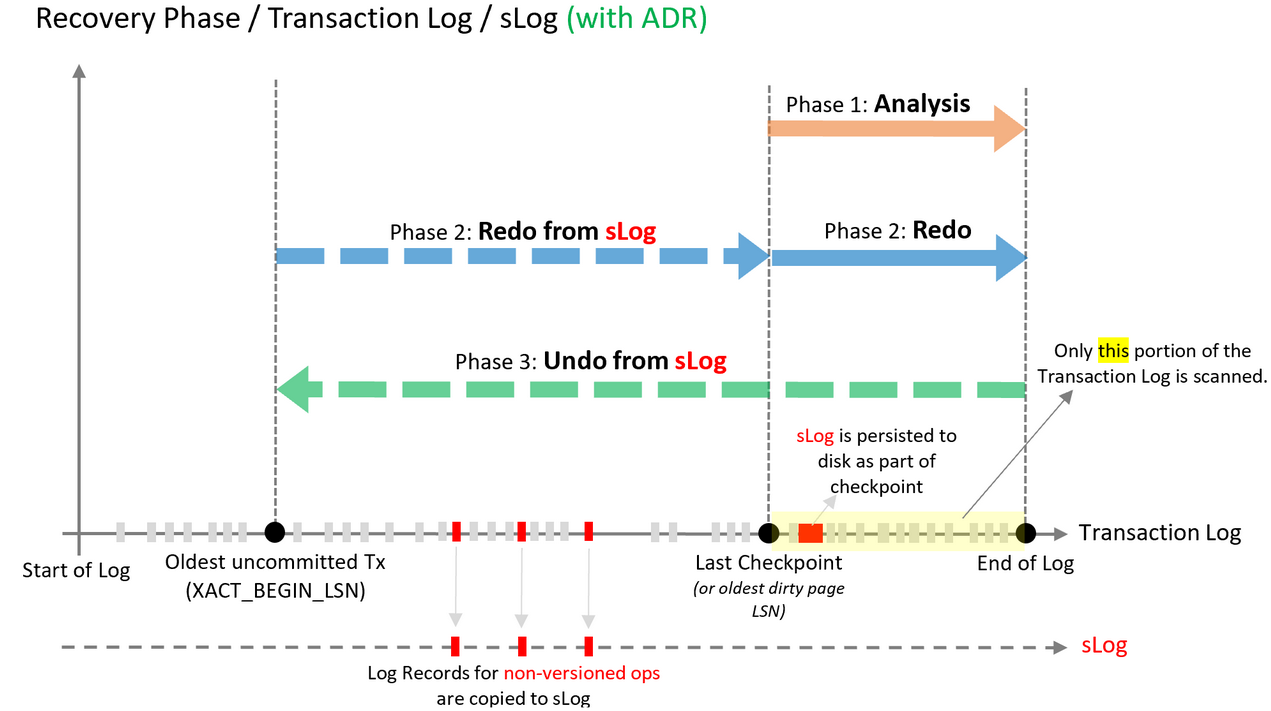
Accelerated Database Recovery (ADR) came out in SQL Server 2019 and is an enhanced way for SQL Server to do database crash recovery. It uses a new Streaming Log (SLOG) feature that allows much faster redo and undo phases of the process by tracking any non-versioned actions.
The Persistent Version Store is another new component to the process. It holds row versions in the database itself, either on the data pages being modified or in a separate system table. This persisted version store is very similar to how read committed snapshot isolation uses row-versions to allow for read and write queries to operate without blocking each other. This holding mechanism for row versions is cleaned up periodically by a background process that removes unneeded row versions. This persisted version store, in combination with the SLOG, allows a couple of things.
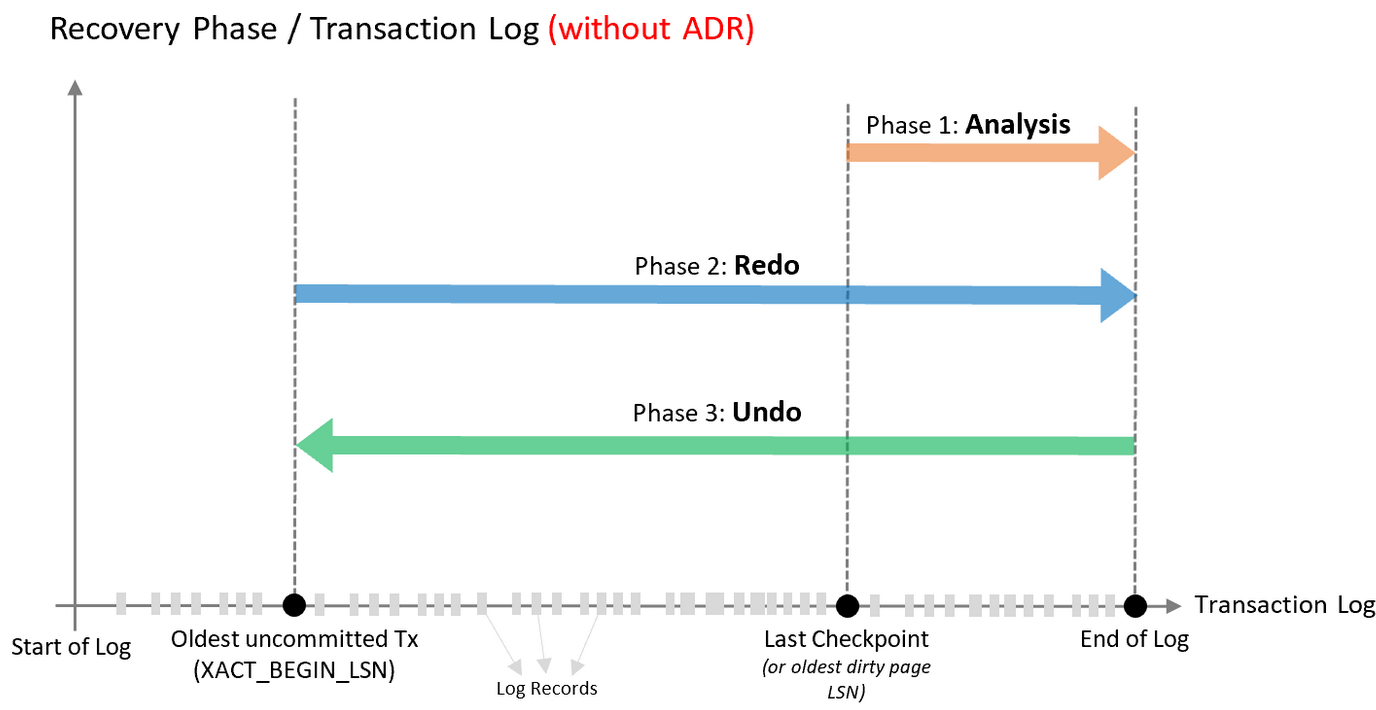
First, in the redo phase there is no longer the need to read the transaction log serially from the oldest uncommitted transaction forward to the time of the crash to replay and redo records for creating a consistent state in the database. Instead, SQL Server uses the SLOG to recover any non-versioned actions from the oldest uncommitted transaction forward up to the point of the last checkpoint. This is much faster. Once the last checkpoint is reached, only then will SQL Server start reading the transaction log for any redo work.
Second, in the Undo phase, the SLOG is used again to undo any non-versioned operations, and the persistent version store is used to simply switch the database rows back to whatever the proper current row was at the time of the crash.
Traditional Recovery: Picture from https://learn.microsoft.com/en-us/sql/relational-databases/accelerated-database-recovery-concepts?view=sql-server-ver17
Recovery using Accelerated Database Recovery: Picture from https://learn.microsoft.com/en-us/sql/relational-databases/accelerated-database-recovery-concepts?view=sql-server-ver17
Why would you want to enable Accelerated Database Recovery?
Accelerated database recovery can save you and your clients from extended outages due to long rollback times under heavy load. I’ve seen rollback times of 45-60 minutes be reduced to seconds with this feature enabled. The use-case I had was during SQL Server patching clients weren’t always out of the system as requested. In some cases, the client activity had a lot of changes in-flight when patching was applied and the traditional recovery method took a very long time after the server rebooted.
I enabled ADR and never had that problem again. This feature can also save you from pain you inflict on yourself. If you’re running a query to make a lot of changes and it is decided to kill the query, causing rollback, then the ADR feature can execute rollback almost instantaneously. This is much better than waiting a long time for single threaded rollback of a query that has been running a long time.
How to determine if Accelerated Database Recovery is enabled?
The system table sys.databases can be queried to show whether this feature is enabled or not.
SELECT name
FROM sys.databases
WHERE is_accelerated_database_recovery_on = 1;
How to enable Accelerated Database Recovery?
An exclusive database lock is required to enable Accelerated Database Recovery. This means the change should be done in a maintenance window where no activity is expected. The feature can be enabled in the presence of other activity using the termination clause WITH ROLLBACK [IMMMEDIATE | AFTER {Number} SECONDS | NO_WAIT] . Using the IMMEDIATE option will immediately rollback other transactions so that the ALTER statement will complete. The NO_WAIT option will terminate the ALTER statement if it can’t be executed immediately. Choose one of the three options.
ALTER DATABASE [<db_name>] SET ACCELERATED_DATABASE_RECOVERY = ON WITH ROLLBACK [IMMMEDIATE | AFTER {Number} SECONDS | NO_WAIT;What sp_configure settings should be adjusted for Accelerated Database Recovery?
First, the ADR Cleaner Thread Count option in sp_configure controls the number of cpu threads to use for the background cleaner process that removes old row versions from the Persisted Version Store. This option was introduced in SQL Server 2022. It is advisable not to set this to a large number. You can increase it from the default of 1 to 2 or perhaps 4 to ensure that Persisted Version Store cleanup is happening quickly enough across a large number of databases.
-- Configure ADR cleaner to use 4 threads
EXEC sp_configure 'show advanced options', 1;
RECONFIGURE;

EXEC sp_configure 'ADR Cleaner Thread Count', 4;
RECONFIGURE WITH OVERRIDE;
Second, the ADR Pre-allocation Factor setting can also be adjusted. If the “just in time” mechanism to allocate pages to store rows in the persisted version store is above zero by a significant amount, then this sp_configure option can be set to allocate pages ahead of time for the version store. There is an extended event called tx_version_optimized_insert_stats that can be reviewed to see what the “just in time” value is. The value to check is labeled “foreground_allocation_percent.”
The default value for the ADR pre-allocation factor is 4. The number of pages allocated at any one time is 512 X the ADR Pre-allocation Factor. It isn’t recommended to set this fact too high because pre-allocating too many pages can cause contention.
-- Configure ADR Preallocation Factor
EXEC sp_configure 'show advanced options', 1;
RECONFIGURE;

EXEC sp_configure 'ADR Preallocation Factor', 6; -- Defaults vary based on workload
RECONFIGURE WITH OVERRIDE;
Is a Long Rollback Costing You Downtime?
SQL Server recovery issues can turn a routine maintenance window into a multi-hour outage. The SERO Group specializes in exactly this kind of proactive SQL Server management. Schedule a free discovery call and let’s talk about your environment.
Recent Comments